
What is it?
depends.cc tracks the state of things (nodes) and what they depend on.
Each node is a traffic light:
When a node's state changes, depends.cc computes the effective state of everything that depends on it. If your database goes red, every service that depends on it is effectively red too — automatically, without updating each one:
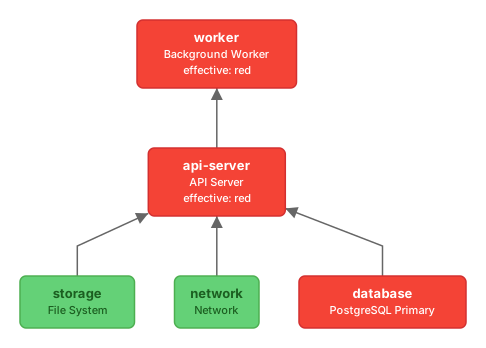
How it works
Dependency graph
Define what depends on what. Effective state propagates automatically. Commit it to source control as YAML.
namespace: myproject

nodes:
  database:
    label: PostgreSQL Primary

  api-server:
    label: API Server
    depends_on:
      - database

  worker:
    label: Background Worker
    depends_on:
      - api-server
Webhooks and email notifications
Get notified when things change. HMAC-signed, with retries. Configure alerts right in your depends.yml:
notifications:
  slack-on-outage:
    watch: "*"
    on: red
    url: https://hooks.slack.com/services/T00000000/B00000000/XXXXXXXXXXXXXXXXXXXXXXXX
    secret: whsec_...

  email-on-outage:
    watch: "*"
    on: red
    email: ops@example.com
    ack: true
Push state (red/yellow/green)
Services report their own health via a single PUT — no polling, no agents.
curl -X PUT https://depends.cc/v1/state/myproject/database/red \
  -H "Authorization: Bearer $DEPENDS_TOKEN"
If you prefer the conventional approach, define meta.checks in depends.yml and run depends check from cron; the CLI probes your HTTP endpoints and pushes green or red for you. See Health checks in the docs.
Reason & solution
Attach human-readable context on every state change: why it's happening, and what to do next.
curl -X PUT https://depends.cc/v1/state/myproject/database/red \
  -H "Authorization: Bearer $DEPENDS_TOKEN" \
  -H "X-Reason: disk full on /var/data" \
  -H "X-Solution: Clear /var/log, expand volume"
AI friendly by design
depends.cc is built for humans and AI agents alike. The simple REST API, plain-text reasons and solutions, and structured YAML format make it easy for AI to read system state, diagnose issues, and act on them. An AI agent can query the graph, see exactly what's red and why, read the suggested solution, and take action — no dashboards or screenshots required.
Get started
Sign up
Sign up at legendum.co.uk and create an account key in your account. See the Sign up page.
Install the CLI
# Install
curl -fsSL https://depends.cc/install.sh | sh

# Sign up and configure
depends signup
export DEPENDS_TOKEN="dep_..."

# Define and push your graph
depends init                                # scaffold depends.yml
depends push                                # sync to depends.cc (auto-creates namespace)
depends status                              # see what's green, yellow, red
depends set myproject/db red --reason "disk full"
depends graph                               # print dependency tree
depends diff                                # preview changes before pushing
depends delete # remove a namespace and all its dataAny language, any platform. If it can make an HTTP request, it can use depends.cc.
Free tier available — see pricing or sign up.